
paudino
Members
-
Joined
-
Last visited
-
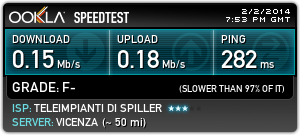
Buonasera a tutti Io ho un problema con wifi4all, ripetitore di Zero Branco (TV). Lo scrivo qui sperando che qualcuno legga, e mi risponda, dato che l'ufficio tecnico non si fa sentire. Segnalazione #466034 Durante il giorno la navigazione è regolare, ma al pomeriggio e alla sera, Ping altissimi e velocità di download quasi inesistente. Tutto questo succede dall'inizio di gennaio 2014. in attesa porgo cordiali saluti P.Audino
-
Ho un problema di connessione, e volevo anche aumentare la banda, ma dopo diverse mail e ticket non ho ricevuto nessuna risposta. pochi minuti fa, però sono riuscito ad parlare con un tecnico .... magia del Forum ? paudino
-
Ciao a tutti sono paudino, cliente felice di wifi4all. domandina.. ma il servizio tecnico e il commerciale di wifi4all a voi risponde alle mail o ai ticket ? paudino